API Reference
The FluxDrive API gives you programmatic access to your storage — the same files you see in the web UI, accessible via HTTP for dApps, scripts, and Web3 integrations.
Overview
The FluxDrive API offers:
- API-based IPFS storage for dApps and Web3 projects
- The same decentralized storage and pricing as the web UI
- A familiar request/response format for developers
- Authentication via your FluxID and a generated API key
The API is available on every paid plan (STARTER, STANDARD, ELITE, and PRO) — there is no separate signup. If you have an active subscription, you can generate API keys and use the endpoints below.
.png)
Getting Started
1. Subscribe to FluxDrive
Sign in at cloud.runonflux.com/flux-drive with your FluxID and choose a plan. Any paid plan grants API access.
2. Install Zelcore Wallet
- Required to access your FluxID for authentication
- FluxID is your account identity for both the web UI and the API
- Download Zelcore at zelcore.io
3. Generate an API Key
Sign in at cloud.runonflux.com/flux-drive and scroll to the API Keys panel, below your storage usage.

1. Click Create key, then give the key a name you'll recognise later — something that identifies the app or machine that will use it. By default the key gets full access; untick any of the four permissions (read, write, list, delete) to restrict what it can do — see Key Permissions.
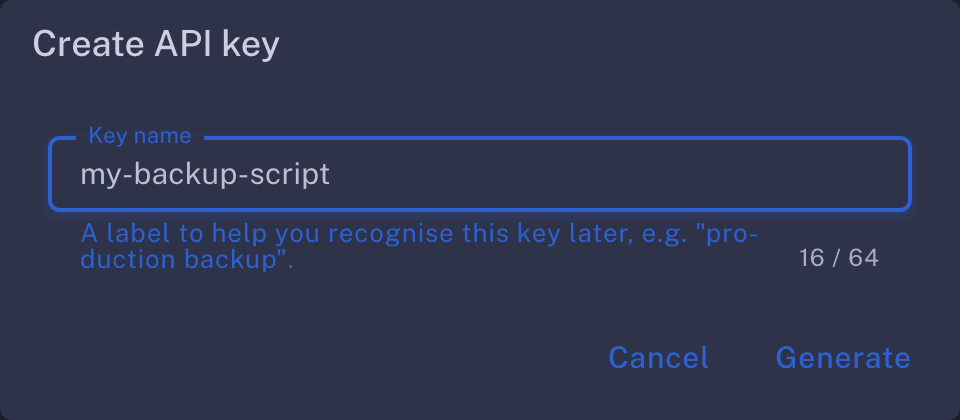
2. Click Generate. Your new key is displayed along with a ready-to-run curl command that already has your FluxID filled in. Use the copy button to the right of either field.

⚠️ The key is shown only once. FluxDrive stores only a hash of it, so it cannot be displayed or recovered again after you close that dialog. If you lose a key, revoke it and create a new one.
3. Store the key somewhere safe — a password manager, or your deployment's secret store — then click I've saved it.
Custom (PRO) plans can be arranged by contacting the Flux team — fill out the PRO Plan Request Form for a custom storage allocation.
4. Managing Your Keys
The same panel lists every key on your account, showing its name, first 8 characters, its permissions, when it was created, and when it was last used — so you can tell which key an integration is actually using before you touch it. A key that has never been used shows Never.

| Action | How | Effect |
|---|---|---|
| Revoke a key | Trash icon next to the key | Immediate. Any application using it starts receiving 401. |
| Create another | Create key | Up to 10 keys per subscription. |
Some practical notes:
- Keys do not expire — they stay valid until you revoke them or the subscription lapses
- A key only works while the subscription is active; an unpaid or expired subscription returns
402on every request - A key grants at most the permissions selected when it was created (full access unless you restricted it), and permissions cannot be changed afterwards — revoke and re-create instead. Treat every key like a password: keep it out of client-side code and out of version control
- Use a separate named key per application, so revoking one never takes down the others
- Keys cannot be used to create or revoke other keys — key management always requires a Zelcore signature from the web UI
Key Permissions (Scopes)
Every key can be restricted to a subset of four permissions, chosen in the Create API key dialog (or via the scopes field of the key-creation API, as an array or comma-separated string):
| Permission | Allows |
|---|---|
read | /cat, /get, /thumb — download file content |
write | /put, /putfolder — upload files |
list | /ls — enumerate files and folders |
delete | /rm — remove files |
Any combination is allowed, and /status works with any valid key — so a key holder can always verify their key and check storage usage.
Scoped keys let you segregate security across machines:
- Give an untrusted node a write-only key (and an obfuscated upload
path): it can deliver files but can never list your directory structure, read other files, or delete anything. - Give a monitoring or administrative node a
list+readkey: it can audit everything but can never modify your system of record, even if the node is compromised.
A request outside the key's permissions returns 403:
{ "error": "API key does not have the 'delete' permission" }
Keys created without restricting permissions — including every key created before permissions existed — have full access, so existing integrations are unaffected.
API Base URL
https://api.fluxdrive.runonflux.io
All endpoints are accessed via POST requests with HTTP Basic authentication:
-u "<ZELID>:<API_KEY_SECRET>"
Limits
| Limit | Value | Notes |
|---|---|---|
| Maximum file size | 5 GB per file | Larger uploads return HTTP 413 |
| PUT rate limit | 150 requests / second | Per ZELID + IP, applies to /put and /putfolder |
| Read rate limit | 1500 requests / second | Per ZELID + IP, applies to every /api/v0 endpoint |
| Storage capacity | Plan-dependent | See plans on the overview page |
| API keys | 10 per subscription | Revoke one to create another |
Exceeding a rate limit returns HTTP 429. The rate-limit budget is keyed on your ZELID combined with your client IP, so separate machines using the same key each get their own allowance.
Authentication & Errors
Every request must include valid Basic auth (-u "<ZELID>:<API_KEY_SECRET>"). Failed requests return JSON with an error field, except for rate limiting — see below.
Authentication failures
| Status | error | Cause |
|---|---|---|
401 | Missing or invalid Authorization header | No Authorization: Basic ... header, or it could not be decoded |
401 | Subscription not found | No FluxDrive subscription exists for that ZELID |
401 | Invalid API key | The key is wrong, or it was revoked |
402 | Subscription payment is not active | Subscription is unpaid, expired, or cancelled |
403 | API key does not have the '<permission>' permission | The key was created without the permission this endpoint requires |
403 | IP address is not whitelisted | Your account has an IP allow-list set and the request came from another address |
ℹ️ IP allow-listing is optional and off by default. If you want your keys usable only from specific addresses, contact the Flux team to have an allow-list applied to your subscription.
Request failures
// 400 — hash missing or malformed
{ "error": "Invalid or missing hash" }

// 400 — upload request carried no file
{ "error": "No file provided" }

// 400 — `path` contains a relative segment such as `.` or `..`
{ "error": "Invalid path segment" }

// 400 — `path` is deeper than 32 levels
{ "error": "Path exceeds 32 levels" }

// 400 — a segment of `path` is longer than 200 characters
{ "error": "Path segment exceeds 200 characters" }

// 402 — subscription lapsed between auth and upload
{ "error": "Subscription not active" }

// 413 — file exceeds the 5 GB per-file limit
{ "error": "File size exceeds 5120Mb" }

// 413 — upload would exceed your plan's storage capacity
{ "error": "Storage capacity exceeded" }

// 404 — hash is not present in your account
{ "error": "File not found" }
⚠️ HTTP 429 is not JSON. Rate-limited requests return the plain-text body
Too many requests, please try again later.— parse defensively rather than assuming anerrorfield.
Supported API Endpoints
All endpoints are POST. Parameters are sent in the request body (form-encoded or JSON), not as query-string arguments.
1. /api/v0/status
Description: Get current storage usage, capacity, and subscription state.
Required permission: none — works with any valid key.
curl "https://api.fluxdrive.runonflux.io/api/v0/status" \
  -X POST \
  -u "<ZELID>:<API_KEY_SECRET>"
Example Response:
{
  "zelid": "1abc...",
  "plan_name": "standard",
  "active": true,
  "capacity_bytes": 53687091200,
  "capacity_gb": 50,
  "storage_used": 2412017,
  "remaining": 53684679183,
  "data_transfer_bytes": 91847362,
  "period_end": 1767225600
}
2. /api/v0/ls
Description: List files in your FluxDrive storage, newest first. Results are paginated.
Required permission: list
Arguments (all optional):
| Field | Type | Default | Notes |
|---|---|---|---|
page | number | 1 | 1-based page number, capped at 10000 |
size | number | 50 | Results per page, capped at 500 |
currentFolder | string | / | Folder path (assets/icons) or a folder UUID — see Folders |
includeFolders | boolean | false | Include folder entries alongside files |
Folder entries carry a uuid and have no hash or size. Pass that uuid back as
currentFolder to list what is inside it.
curl "https://api.fluxdrive.runonflux.io/api/v0/ls" \
  -X POST \
  -u "<ZELID>:<API_KEY_SECRET>" \
  -d "page=1" \
  -d "size=50"
Example Response (shortened):
{
  "files": [
    {
      "name": "21045.png",
      "hash": "QmdMfrUsh8tvAj5MuWEFxYR7VjpmXvihxSZZZWoJYE3LMR",
      "size": 37161,
      "mimetype": "image/png",
      "type": "image",
      "timestamp": 1699457573592,
      "added_time": 1699457573
    }
  ],
  "files_per_page": 50,
  "total_files": 1
}
3. /api/v0/put
Description: Upload a single file. Subject to the 5 GB per-file limit and your plan's remaining capacity. To upload several files in one request, use /putfolder.
Required permission: write
The form field name is not significant — the first uploaded file in the request is used.
Arguments:
path(string, optional) — folder to place the file in, e.g.qdrant/backups. Missing folders are created; see Folders. Omit it to upload to the root.
curl "https://api.fluxdrive.runonflux.io/api/v0/put" \
  -X POST \
  -u "<ZELID>:<API_KEY_SECRET>" \
  -F path="qdrant/backups" \
  -F file=@"./21045.png"
Example Response:
{
  "hash": "QmdMfrUsh8tvAj5MuWEFxYR7VjpmXvihxSZZZWoJYE3LMR",
  "name": "21045.png",
  "size": 37161,
  "mimetype": "image/png",
  "thumbnail": "QmXo1x9pTgtvAj5MuWEFxYR7VjpmXvihxSZZZWoJYE3aBc"
}
thumbnail is the IPFS hash of a generated preview, or null when none was produced. Thumbnails are only generated for images under 50 MB.
4. /api/v0/putfolder
Description: Upload multiple files in a single request, optionally into a folder path.
Required permission: write
Arguments:
path(string, optional) — folder to place the files under; every file in the request shares it. Missing folders are created; see Folders. Leading, trailing and repeated slashes are ignored.
curl "https://api.fluxdrive.runonflux.io/api/v0/putfolder" \
  -X POST \
  -u "<ZELID>:<API_KEY_SECRET>" \
  -F path="assets/icons" \
  -F file=@"image.png" \
  -F file=@"metadata.json"
Example Response:
{
  "path": "assets/icons",
  "files": [
    { "name": "image.png", "hash": "QmNaS1f8RDbQ9jz5FGkZWvzG5VA6jp4JJBEwQ2DLzhWN8V", "size": 1965233 },
    { "name": "metadata.json", "error": "Pinning failed" }
  ]
}
ℹ️
/putfolderreports per-file outcomes. The request can return200while individual entries carry anerrorfield. Always inspect each entry rather than relying on the status code alone.
5. /api/v0/cat
Description: Stream the contents of a file inline.
Required permission: read
Arguments:
hash(string, required) — IPFS hash of a file in your account
curl "https://api.fluxdrive.runonflux.io/api/v0/cat" \
  -X POST \
  -u "<ZELID>:<API_KEY_SECRET>" \
  -d "hash=<HASH>"
Responses are served with X-Content-Type-Options: nosniff, and HTML/SVG/XML content types are downgraded to application/octet-stream so the API cannot be used to host executable web content.
6. /api/v0/get
Description: Download a file as an attachment. Identical to /cat except that a Content-Disposition: attachment header is set.
Required permission: read
curl "https://api.fluxdrive.runonflux.io/api/v0/get" \
  -X POST \
  -u "<ZELID>:<API_KEY_SECRET>" \
  -d "hash=<HASH>" \
  -o downloaded-file
7. /api/v0/rm
Description: Remove a file from your FluxDrive account. The hash is unpinned from your subscription; if no other account references it, the cluster will eventually garbage-collect the underlying blocks.
Required permission: delete
curl "https://api.fluxdrive.runonflux.io/api/v0/rm" \
  -X POST \
  -u "<ZELID>:<API_KEY_SECRET>" \
  -d "hash=<HASH>"
Example Response:
{ "success": "File removed", "hash": "QmdMfrUsh8tvAj5MuWEFxYR7VjpmXvihxSZZZWoJYE3LMR" }
8. /api/v0/thumb
Description: Retrieve the generated thumbnail for a file, as image/jpeg. Returns 404 with { "error": "No thumbnail" } when the file has none.
Required permission: read
curl "https://api.fluxdrive.runonflux.io/api/v0/thumb" \
  -X POST \
  -u "<ZELID>:<API_KEY_SECRET>" \
  -d "hash=<HASH>" \
  -o thumbnail.jpg
Folders
Pass path to /put or /putfolder to organise uploads into folders:
curl "https://api.fluxdrive.runonflux.io/api/v0/put" \
  -X POST \
  -u "<ZELID>:<API_KEY_SECRET>" \
  -F path="qdrant/backups" \
  -F file=@"./snapshot.tar"
Any folder in the path that does not exist yet is created, and one that does — including a folder you made in the FluxDrive web interface — is reused rather than duplicated. Folders created this way are ordinary folders: they appear in the web interface, and you can rename, move or delete them there.
List a folder's contents by passing the same path back to /ls:
curl "https://api.fluxdrive.runonflux.io/api/v0/ls" \
  -X POST \
  -u "<ZELID>:<API_KEY_SECRET>" \
  -d "currentFolder=qdrant/backups"
Path rules. Segments are separated by /. Leading, trailing and repeated slashes are
ignored, so /qdrant//backups/ and qdrant/backups are the same folder. A path may be up to
32 levels deep, each segment up to 200 characters. Relative segments (. and ..) are
rejected. A path that breaks these rules returns 400 and nothing is uploaded.
Folder names are unique within their parent: one account cannot hold two folders called
backups in the same place. File names are not — several files in one folder may share a
name, and each is addressed by its own hash.
ℹ️ Listing by path reflects where a file was uploaded, not where it was later moved. If you move or rename a file or folder in the web interface, the web interface is always correct, but
/lswith the original path will still list the file at its old location. To follow moves, list by folderuuid(setincludeFolders=true, then pass a folder'suuidascurrentFolder) instead of by path.
Notes
- All commands must be executed from a terminal (e.g., VSCode integrated terminal, Ubuntu, or similar).
- Parameters go in the request body —
/api/v0does not read query-string arguments. - API access is protected via ZELID and API_KEY_SECRET — keep your key secret. If a key is leaked, revoke it in the web UI and generate a replacement.